🗂️ Items in Category
The Items in Category menu is an indispensable filtering and navigation tool, especially as your knowledge base grows and becomes more complex. It allows you to organize large amounts of data thematically and display all nodes (items) that you have assigned to a specific group as a clear list.
🔽 Select Category
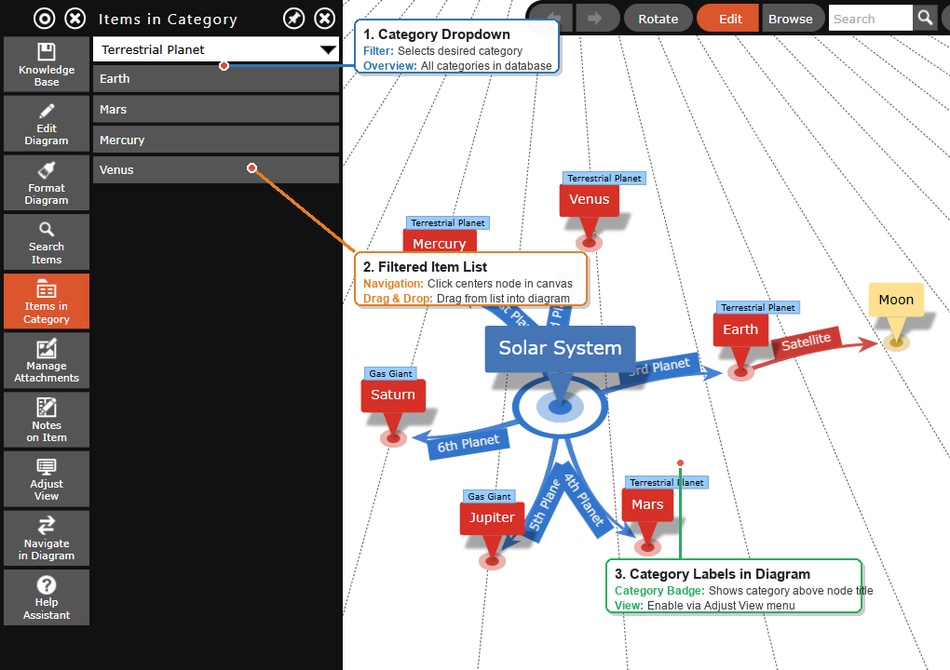
At the very top of the menu window, you will find a drop-down menu that you can use to control the view.
- Drop-down list: Clicking on it opens all item categories that you have ever created in your current database (e.g., "People", "Ideas", "Books", "Companies"). Select a category to immediately list all associated items below.
- Items without Category: This is the default setting. Select this entry to list all nodes to which you have not yet assigned a specific category.
- Empty Categories: If you select a category to which no nodes are currently assigned, the message "There are no items in the selected category" appears.
Tags are listed as well
The list shows all items that carry the selected name — no matter whether as a category or as a tag. Since an item can have any number of tags, it may therefore appear under several entries of the drop-down list.
🎯 Diagram Navigation (Centering)
The list does not only serve as a pure overview, but is a powerful tool to navigate through gigantic 3D networks at lightning speed.
What a click on an entry in the list does depends on the view:
- Diagram (2D): The item is selected in the diagram. If Always Load Target is switched on under Navigate in Diagram, it becomes the new root item instead, and the diagram is rebuilt around it.
- Practical example: With “Always Load Target” on, click on the year "1863" in the list: this item becomes the root and you immediately see all "People" items connected to this birth year in the diagram.
- 3D view: The camera flies to the item and brings it to the front; the root stays where it is. This way you can present the items of a category one by one. It works best with items that have no children – with an item that has children, a child may stand between the camera and the target.
The panel does not highlight the items of the chosen category in the diagram itself.
💡 Pro Tip: Draw relations via drag-and-drop
This menu offers a fantastic, time-saving automation to quickly integrate existing items from the list into new diagram branches:
Quick Linking: You can drag items directly from the sidebar into the 3D diagram! Click on an item in the list, click and hold the mouse button (or your finger), and drag the item via drag-and-drop to any target item in your visible diagram. The system then automatically creates a new relation line between the two nodes. This is particularly useful when evaluating collections or quickly linking existing nodes to new ideas.